
The Pickleball Serve Analyzer
Check your serve motion. Understand the rule.
Upload a slow-motion video of your pickleball volley serve and see how your motion compares with three USA Pickleball 2026 serve requirements: upward serving motion, paddle-head height relative to your wrist, and ball-contact height relative to your waist.
The Pickleball Serve Analyzer estimates the contact frame, lets you adjust it, and shows its findings with points marked on the image.
To see an exampleof how the Analyzer works and for more explanation see our blog How to Tell if Your Pickleball Serve is Legal.
What to upload
Upload an existing 720p or higher slow-motion video recorded at 240 frames per second. Maximum file size: 500 MB.
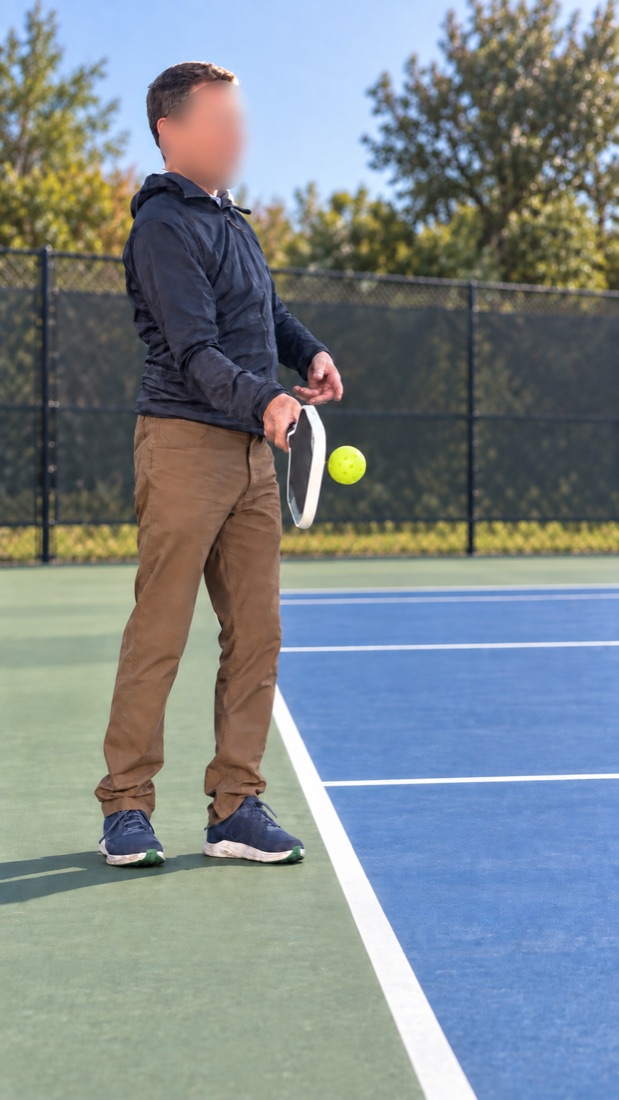
Example filming angle
Use this side-on angle for the best performance from the app. Position the camera beside your serving arm at waist height, and keep your whole body, ball and full paddle swing in view.
You don’t need to be on a pickleball court.
Keep your clip under one minute. Longer videos can take much longer to process. Trim unnecessary footage, but keep the whole swing in slow motion.
- Fill the frame with the player. Move closer so your body fills most of the image height, while keeping your head, feet, ball and complete paddle swing visible. Avoid large areas of empty sky or ground; framing matters more than a fixed distance.
- Film from beside the serving arm, not from in front of the player. Keep the paddle and wrist clearly visible against a contrasting background.
- Hold the camera at waist height to help compare the paddle, wrist and waist. On a court, film from the side along the baseline.
- Keep the entire swing in the slow-motion portion of the clip, including when trimming or exporting your video.
You can record in a suitable space away from a court. The app does not assess foot faults.
On iPhone, check Settings → Camera → Record Slo-mo and choose 240 fps. Available resolutions and defaults vary by model. The app checks your video’s resolution and asks you to confirm that you recorded it in slow motion at 240 fps.
How it works
- Choose your video. Select an existing clip from your phone or computer.
- Upload and process. The app prepares your video and estimates when the ball meets the paddle.
- Find contact. Review the suggested image. Use the forward and backward buttons to find the frame where the ball contacts the paddle, then confirm the statements and select Analyze this contact frame.
- Review your results. See the three checks and the points marked on the image on a separate results screen.
You can briefly switch apps and return. Uploads resume when you return; server processing continues while you’re away. Your session is available for up to two hours, unless the server restarts.
Understanding your results
Each check returns PASS, LIKELY PASS, LIKELY FAIL, FAIL or CANNOT DETERMINE, with an explanation of what the app detected. Review the contact frame and marked points: a blurry or obscured view can affect the result.
This beta is an educational tool, not an official referee or a ruling on serve legality.
Your video
Your video is uploaded to our analysis server. Your video, decoded images and results expire after two hours or a server restart. Choosing New video also removes your session.